Showing posts with label SharePoint. Show all posts

Wednesday, January 25, 2012

SharePoint Organization Charts

Update 2/3/2012
- 1orgchart did not seem to work at all and support could not resolve
- Found another third party http://www.sharepointorgchart.com/ that worked and met most requirements.

1/23/2012
Based on some recent work for a customer here are my findings on the SharePoint Org Chart Control and Third party solutions.


Out of the Box SharePoint Org Chart
AD User Profile as Source
Yes
Yes
Yes
Yes
Graphical/Interactive Org Chart
Yes
Yes
Tree view Only
No – Tabular only
Amend fields Shown in Org Chart Boxes
Limited
Yes
No Boxes just tree view
No – Tabular only
Search
Not directly within chart
Yes
Yes
Yes
Tree View
HTML Tree View
Yes
Yes
No
Color Coding
No
Yes
No
Yes
Print
Limited
Yes
Limited
Limited
Presence Integration
Yes
Yes
Yes
Yes
Link to MySite Profile
Yes
Yes
Yes
Yes
Customizable Style
No
Yes
No
Limited
Export chart
No
Yes as Jpeg
No
No
Multiple Views of Chart
No
Yes
Yes
No
Custom Starting point of Chart – CIO down for example
No
Yes
Yes
Filter by departments
Custom Depth of Hierarchy displayed
No
Yes
Yes
No
Picture Integration
Yes
Yes
Yes
Yes
Trial Version Available
Yes
Yes
Yes
Yes
User can update attributes in AD
No
No
Yes
No

Monday, January 23, 2012

Copy SharePoint 2010 Pages

This is a common challenge. You create a wonderful SharePoint Page with all the web parts you like configured correctly and in the correct locations. Now you wish to copy the page keep all the web parts and content but allow for tweaking same. What do you typically do?  

- You open the library in "Explorer View"
- Copy the page and rename it.
- Open the page
- All your web parts are lost.

There is a way around this.

- You can copy pages using the "Content and Structure" tool, but not to the same folder in the library.
Go to SiteActions -> Site Settings -> Manage Content and Structure. Navigate to the pages list. Copy the page to a different pages list of folder in the library. Rename the copied page. Move the copied page back to the original pages list or folder. The web parts will be still there.
Note: If you do not have versioning turned on the library this will not work.

Monday, October 10, 2011

InfoPath - List Forms versus Form Libraries (Offline Access)

Recently spending a lot of time dealing with forms and workspaces in SharePoint 2010. If you require offline access here is a summary.


·         SharePoint list Form
o   Store data directly in a SharePoint list
o   SharePoint list forms are directly connected to one SharePoint list
o   Works well offline with SharePoint Workspace
·         Form library Form
o   Stores data in XML files in a SharePoint form library
o   Allows for more flexible functionality including code behind
o   Ability to choose the publish location and ability to publish to multiple locations
o   Not supported in SharePoint Workspace
o   Offline ability with users however would require manually steps to upload to SharePoint or custom app to handle upload

·         Common InfoPath form requirements:
o   Ease of Use for users
o   Ability to fill out multiple forms offline
o   Automatically sync to SharePoint when online
o   Repeating data on each form (Example: mutiple vacation requests)
o   Ability to change form and publish to another list in SharePoint to capture new data

·         Solution A: SharePoint List Form
o   Pros:
§  Ease of Use for users
§  Ability to fill out multiple forms offline
§  Automatically sync to SharePoint when online: This accommodates the ability to fill out the forms offline and using SharePoint Workspace sync easily
o   Cons with Solutions:
§  Repeating data on each form: You cannot include code to fill out data based on a drop down field. However we would suggest including a dropdown that is a look up to another list.
§  Ability to change form and publish to another list in SharePoint to capture new data: When a new field is required and the ability to push data to a new list is needed – we suggest saving the current list as a template (which will include the customized form) and modify the new form and republish to a new list.
·         Solution B: Forms Library Form
o   Pros:
§  Ease of Use for users
§  Ability to fill out multiple forms offline: This requires InfoPath filler on the client machine.
§  Repeating data on each form: We can use code behind to populate the data based on master list data.
§  Ability to change form and publish to another list in SharePoint to capture new data: The same form template could be updated with new fields and republished to another library easily.
o   Cons with Solutions:
§  Automatically sync to SharePoint when online: There is not an automatic way for the offline forms to be synced with SharePoint. The user can upload the forms into the forms library or a custom solution can be built.

Sunday, August 28, 2011

Office 365 Extranet Users - Minor Gotcha

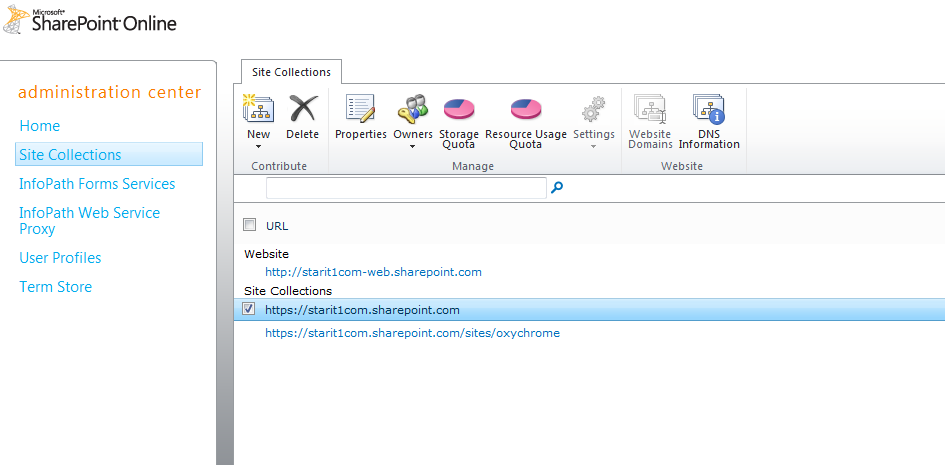
Today I was adding external users to a site collection for a customer and ran into a learning experience. To enable "external sharing" the site collection feature needs to be enabled and "Manage External Users" need to be enabled on "Manage Site Collections" on the site admin portal.


The issue I ran into was related to was related to enabling "Manage External Users" which is enabled under site collection settings. The "settings" is grayed out unless you deselect all site collections - not the most intuitive as you would presume it is related to individual site collections and not all at once.


Greyed Out:


Not Greyed Out:

Monday, August 22, 2011

SharePoint End to End Performance Optimization - Just Added Riverbed

Clearway Announces Partnership with Riverbed Technology to Optimize Application Performance

August 22nd, 2011
Clearway today announced it has partnered with Riverbed Technology to deliver application performance optimization solutions. Clearway will provide sales and deployment services of Riverbed solutions for the northeastern United States.
More than 13,000 organizations worldwide, across a wide range of markets, depend on Riverbed to understand, optimize and consolidate their IT infrastructure. Riverbed delivers hardware, software and virtualized solutions that overcome performance issues caused by distance, distributed computing, and ever increasing amounts of data. Riverbed provides the only comprehensive WAN optimization solutions to a host of problems that prevent enterprises from sharing applications and data across wide-area networks anywhere in the world.

Link

Wednesday, August 10, 2011

SharePoint End to End Performance Optimization

Need all bases covered in your SharePoint perfomance challenges. Clearway has you covered.

 “Our comprehensive SharePoint performance optimization solutions now include: database tuning, SharePoint application tuning, WAN acceleration, content caching, and Internet route optimization. Clearway can help organizations make applications delivered over the Internet behave as if they were on their private LAN.”

Link

Friday, July 29, 2011

Tuesday, July 19, 2011

Colm Whelan to present at SharePoint Saturday New Hampshire September

This is a synopsis of my presentation coming up in September.

Colm is an accomplished New England based SharePoint consultant with over 60 implementations under his belt and has been working fulltime on SharePoint engagements since 2005. His specialties include ECM, Governance, Upgrades, Workflow and Microsoft Online Services. Colm is currently assisting Microsoft with the Office 365 SharePoint rollout through the “Technology Adoption Program” TAP. Colm is from Ireland where he worked for Microsoft and has lived in in the Northeast for 9 years.

Microsoft Office 365 is a subscription service that combines Microsoft Office Web Applications with a set of web-enabled tools that are easy to learn and use, that work with your existing hardware, and that come backed by the robust security, reliability, and control you need to run your business. Office 365 helps you communicate and collaborate more effectively with always-up-to-date software. Microsoft Office 365 lets you work from virtually anywhere and on almost any device. 

Join us for a lively and focused discussion that will include:
- Economics of the Cloud - Why is Office 365 Important to Me?
- What is Office 365 SharePoint Online?
- What's New in Office 365 SharePoint Online?
- What are the Differences Between Office 365 SharePoint Online and SharePoint On-Premise?  
- How Do I Deploy?

Link to SPSNH

Monday, July 11, 2011

SharePoint 2010 - 4TBs databases SP1

 With the release of SP1 SharePoint 2010 now supports up to 4TBs databases under specific circumstances liste below. Go to Link for more information.
  • For a SharePoint content database up to 200 GB there are no special requirements and this limit is included for consistency.
  • For a SharePoint content database up to 4 TB you need to additionally plan for the following two requirements:
    • Requires disk sub-system performance of 0.25 IOPS per GB, 2 IOPS per GB is recommended for optimal performance.
    • Requires the customer to have plans for high availability, disaster recovery, future capacity, and performance testing.
  • For a SharePoint content database over 4TB specifically for a Document Archive scenario you are required to additionally plan for the following:
    • SharePoint sites must be based on Document Center or Records Center site templates and must be an archive scenario where less than 5% of content is actively read from each month and less than 1% of content is actively written to.
    • Do not use alerts, workflows, link fix-ups, or item level security on any SharePoint objects in the content database. Note: document archive content databases can be the recipient of documents as a result of Content Routing workflow.
  • Other specific limits changes being made at the same time:
    • A new limit of 60million items in any one SharePoint content database
    • The specific 5 TB limit per SQL Server instance has been removed. Instead you should work with a SQL Server professional to plan for database storage.

Wednesday, June 29, 2011

SharePoint 2010 SP1 - Install It


Service Pack 1 (SP1) for SharePoint Foundation 2010 and SharePoint Server 2010
  • Shallow copy functionality
  • Site-level recycle bin
  • Improvements to storage management (StorMan.aspx)
  • Cascading filters for Performance Point services
  • Additional browser support
  • Support for SQL Server - Code Name "Denali" (SQL Server 2011)


Link

Monday, June 27, 2011

Using SharePoint for ECM - How well is it meeting expectations?

AIIM has a great report on SharePoint and expectations. If you are experiencing these issues leverage Clearway and our Governance experience.

"The 2010 version of SharePoint brings specific improvements for content management and information governance. We measure users’ opinions of these changes, and the continued popularity of third-party add on products and integrations, with over 75% considering add-ons for BPM, classification, security, back-up and records archive. We also explore the issues found by users during their upgrade to 2010, track strategies for SharePoint usage alongside existing Capture, ECM and RM systems, and make recommendations based on the survey results."


Link to Report

Monday, June 20, 2011

Four Ways the Red Sox are Scoring with SharePoint

The Boston Red Sox have many weapons to keep the team winning on the field: powerful hitters, a seasoned pitching rotation, and an experienced coaching staff.

But off the field -- and in the data center -- a key role player for the Sox has been SharePoint 2010.

At the SPTechCon SharePoint conference in Boston last week, Red Sox IT director Steve Conley stepped up to the plate for a Q&A with Microsoft's (MSFT) SharePoint Product Management Director Christian Finn.

Link to Story

Wednesday, June 15, 2011

My Site Organization Browser is Blank in 2010

This can happen especially if an underlying "User Profile" is edited or deleted.

The issue may present itself as an empty silverlight web part or if you clink "HTML View" of the organization you may receive an error "error processing this request".

To resolve:

1: Clear the end user browser cache

2: If Step 1 does not work Reset IIS on the SharePoint front end server.

Sunday, June 12, 2011

SharePoint 2010 WCM Improvements

- Ratings
- Ribbon
- In place editing
- Metadata (unstructured Tagging)
- Media Content (video, audio, web parts etc.)
- Web Analytics more advanced
- AJAX less refreshing
- Multi Browser Support
- SharePoint Designer 2010

Office 365 SharePoint Highlights

Current highlights of Office 365 SharePoint. Vast improvements over BPOS.

- SSO (Ad Synchronization)
- MySites
- Enterprise Search
○ All Sites
○ Search Scopes
○ Search Keywords
- Public facing sites support albeit limited
- Term Store
- InfoPath forms services
- Sandboxed solutions
- Friendly URLS
- Invite outside domain users (extranet) (not on domain)
○ Directs to set up a Live ID and hotmail (not good)
- More OOB Workflows
- Records Management
- Document Sets
- Office Web Apps
- eDiscovery
- Content Organizer
- Customization deployments
- Access Services
- Dual editing of Office Docs
- lots more Site Templates
- Composites? No
- Insights? No
- Office Professional Desktop license part of the deal (for more monthly fees)
- Incoming email? No

Office 365 Roundtable

Office 365 SharePoint: Is It Right for You?

Microsoft Office 365 is a subscription service that combines Microsoft Office Web Applications with a set of web-enabled tools that are easy to learn and use, that work with your existing hardware, and that come backed by the robust security, reliability, and control you need to run your business. Office 365 helps you communicate and collaborate more effectively with always-up-to-date software. Microsoft Office 365 lets you work from virtually anywhere and on almost any device.


Join us at this Executive Roundtable for a lively and focused discussion that will include:

- Cloud Overview

- Economics of the Cloud – Why is Office 365 Important to Me?

- What is Office 365 SharePoint Online?

- What’s New in Office 365 SharePoint Online?

- What are the Differences Between Office 365 SharePoint Online and SharePoint On-Premise?

- How Do I Deploy?

http://www.clearwaypartners.com/office-365-sharepoint-executive-roundtable/

Saturday, April 2, 2011

Re-enable Visual Upgrade in SharePoint 2010

Upgrading a client to 2010 Enterprise this weekend and ran into an issue where Visual Upgrade was hidden by an admin acidentally. We needed to restore................................Here is the Powershell to iterate through each site and re-enable. It cannot be reenabled through the GUI.

$SiteCollection=Get-SPsite http://sitecollection/

foreach($SPWeb in $SiteCollection.AllWebs) {$SPWeb.UIversionConfigurationEnabled=$true;$SPWeb.update();}