Sunday, September 25, 2011

Sunday, August 28, 2011
Office 365 Extranet Users - Minor Gotcha
Today I was adding external users to a site collection for a customer and ran into a learning experience. To enable "external sharing" the site collection feature needs to be enabled and "Manage External Users" need to be enabled on "Manage Site Collections" on the site admin portal.
The issue I ran into was related to was related to enabling "Manage External Users" which is enabled under site collection settings. The "settings" is grayed out unless you deselect all site collections - not the most intuitive as you would presume it is related to individual site collections and not all at once.
Greyed Out:

Not Greyed Out:

The issue I ran into was related to was related to enabling "Manage External Users" which is enabled under site collection settings. The "settings" is grayed out unless you deselect all site collections - not the most intuitive as you would presume it is related to individual site collections and not all at once.
Greyed Out:
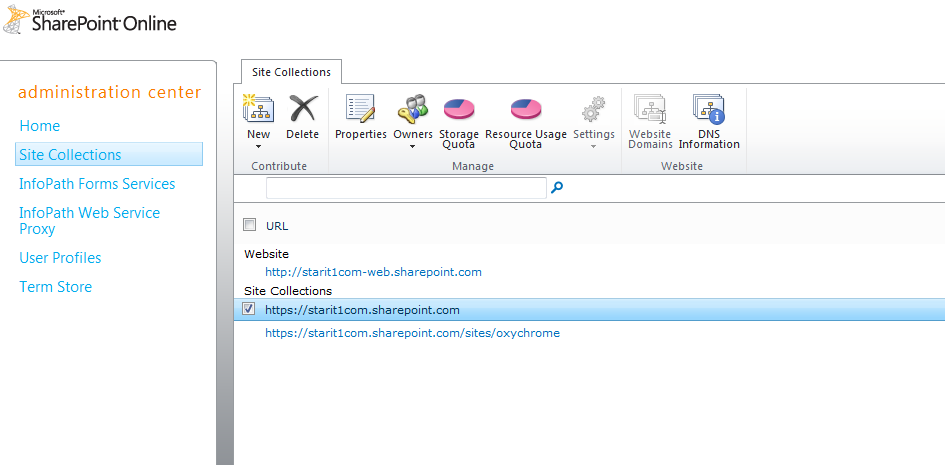
Not Greyed Out:

Monday, August 22, 2011
SharePoint End to End Performance Optimization - Just Added Riverbed
Clearway Announces Partnership with Riverbed Technology to Optimize Application Performance
August 22nd, 2011Clearway today announced it has partnered with Riverbed Technology to deliver application performance optimization solutions. Clearway will provide sales and deployment services of Riverbed solutions for the northeastern United States.
More than 13,000 organizations worldwide, across a wide range of markets, depend on Riverbed to understand, optimize and consolidate their IT infrastructure. Riverbed delivers hardware, software and virtualized solutions that overcome performance issues caused by distance, distributed computing, and ever increasing amounts of data. Riverbed provides the only comprehensive WAN optimization solutions to a host of problems that prevent enterprises from sharing applications and data across wide-area networks anywhere in the world.
Link
More than 13,000 organizations worldwide, across a wide range of markets, depend on Riverbed to understand, optimize and consolidate their IT infrastructure. Riverbed delivers hardware, software and virtualized solutions that overcome performance issues caused by distance, distributed computing, and ever increasing amounts of data. Riverbed provides the only comprehensive WAN optimization solutions to a host of problems that prevent enterprises from sharing applications and data across wide-area networks anywhere in the world.
Link
Wednesday, August 10, 2011
SharePoint End to End Performance Optimization
Need all bases covered in your SharePoint perfomance challenges. Clearway has you covered.
“Our comprehensive SharePoint performance optimization solutions now include: database tuning, SharePoint application tuning, WAN acceleration, content caching, and Internet route optimization. Clearway can help organizations make applications delivered over the Internet behave as if they were on their private LAN.”
Link
“Our comprehensive SharePoint performance optimization solutions now include: database tuning, SharePoint application tuning, WAN acceleration, content caching, and Internet route optimization. Clearway can help organizations make applications delivered over the Internet behave as if they were on their private LAN.”
Link
Friday, July 29, 2011
Learn How SharePoint Online Can Supplement Your On Premise Deployment.
Microsoft has put together learning materials about how SharePoint Online can help supplement your on-premise SharePoint 2010 Products deployment.
Video Learning Series
Video Learning Series
Narrated Presentation
Whitepaper
Tuesday, July 19, 2011
Colm Whelan to present at SharePoint Saturday New Hampshire September
This is a synopsis of my presentation coming up in September.
Colm is an accomplished New England based SharePoint consultant with over 60 implementations under his belt and has been working fulltime on SharePoint engagements since 2005. His specialties include ECM, Governance, Upgrades, Workflow and Microsoft Online Services. Colm is currently assisting Microsoft with the Office 365 SharePoint rollout through the “Technology Adoption Program” TAP. Colm is from Ireland where he worked for Microsoft and has lived in in the Northeast for 9 years.
Colm is an accomplished New England based SharePoint consultant with over 60 implementations under his belt and has been working fulltime on SharePoint engagements since 2005. His specialties include ECM, Governance, Upgrades, Workflow and Microsoft Online Services. Colm is currently assisting Microsoft with the Office 365 SharePoint rollout through the “Technology Adoption Program” TAP. Colm is from Ireland where he worked for Microsoft and has lived in in the Northeast for 9 years.
Microsoft Office 365 is a subscription service that combines Microsoft Office Web Applications with a set of web-enabled tools that are easy to learn and use, that work with your existing hardware, and that come backed by the robust security, reliability, and control you need to run your business. Office 365 helps you communicate and collaborate more effectively with always-up-to-date software. Microsoft Office 365 lets you work from virtually anywhere and on almost any device.
Join us for a lively and focused discussion that will include:
- Economics of the Cloud - Why is Office 365 Important to Me?
- What is Office 365 SharePoint Online?
- What's New in Office 365 SharePoint Online?
- What are the Differences Between Office 365 SharePoint Online and SharePoint On-Premise?
- How Do I Deploy?
Link to SPSNH
Monday, July 18, 2011
Unable to Configure the Microsoft Dynamics CRM Client for Outlook against Dynamics CRM Online
Slightly off topic but as a MSFT cloud partner I use Dynamics CRM Online all the time.
If you run into an issue whereby you no longer (or never could) connect your outlook client to CRM Online please try this fix.
- If you have Windows Live essentials 2011 (in my case I use Live Mesh)
- Run a repair on the Windows Live Essentials 2011.
- Then try to run the dynamics crm configuration wizard again.
Worked for me.
If you run into an issue whereby you no longer (or never could) connect your outlook client to CRM Online please try this fix.
- If you have Windows Live essentials 2011 (in my case I use Live Mesh)
- Run a repair on the Windows Live Essentials 2011.
- Then try to run the dynamics crm configuration wizard again.
Worked for me.
Subscribe to:
Posts (Atom)