Monday, October 10, 2011

InfoPath - List Forms versus Form Libraries (Offline Access)

Recently spending a lot of time dealing with forms and workspaces in SharePoint 2010. If you require offline access here is a summary.


·         SharePoint list Form
o   Store data directly in a SharePoint list
o   SharePoint list forms are directly connected to one SharePoint list
o   Works well offline with SharePoint Workspace
·         Form library Form
o   Stores data in XML files in a SharePoint form library
o   Allows for more flexible functionality including code behind
o   Ability to choose the publish location and ability to publish to multiple locations
o   Not supported in SharePoint Workspace
o   Offline ability with users however would require manually steps to upload to SharePoint or custom app to handle upload

·         Common InfoPath form requirements:
o   Ease of Use for users
o   Ability to fill out multiple forms offline
o   Automatically sync to SharePoint when online
o   Repeating data on each form (Example: mutiple vacation requests)
o   Ability to change form and publish to another list in SharePoint to capture new data

·         Solution A: SharePoint List Form
o   Pros:
§  Ease of Use for users
§  Ability to fill out multiple forms offline
§  Automatically sync to SharePoint when online: This accommodates the ability to fill out the forms offline and using SharePoint Workspace sync easily
o   Cons with Solutions:
§  Repeating data on each form: You cannot include code to fill out data based on a drop down field. However we would suggest including a dropdown that is a look up to another list.
§  Ability to change form and publish to another list in SharePoint to capture new data: When a new field is required and the ability to push data to a new list is needed – we suggest saving the current list as a template (which will include the customized form) and modify the new form and republish to a new list.
·         Solution B: Forms Library Form
o   Pros:
§  Ease of Use for users
§  Ability to fill out multiple forms offline: This requires InfoPath filler on the client machine.
§  Repeating data on each form: We can use code behind to populate the data based on master list data.
§  Ability to change form and publish to another list in SharePoint to capture new data: The same form template could be updated with new fields and republished to another library easily.
o   Cons with Solutions:
§  Automatically sync to SharePoint when online: There is not an automatic way for the offline forms to be synced with SharePoint. The user can upload the forms into the forms library or a custom solution can be built.

Sunday, August 28, 2011

Office 365 Extranet Users - Minor Gotcha

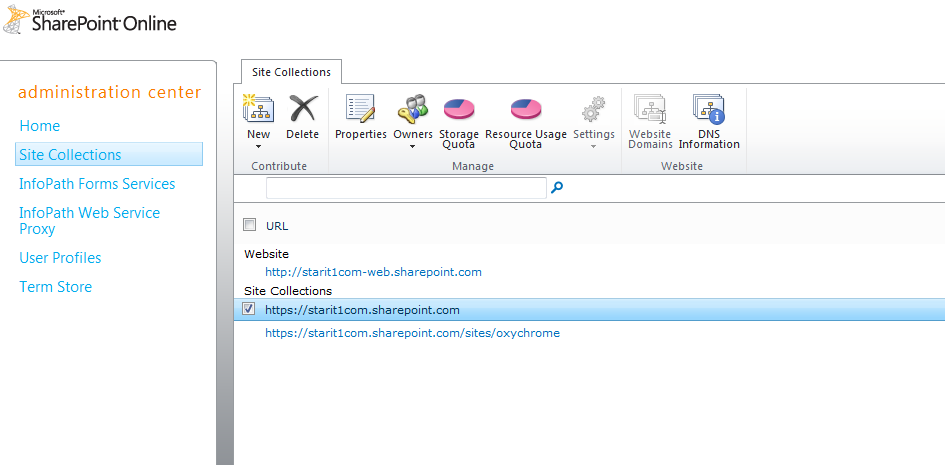
Today I was adding external users to a site collection for a customer and ran into a learning experience. To enable "external sharing" the site collection feature needs to be enabled and "Manage External Users" need to be enabled on "Manage Site Collections" on the site admin portal.


The issue I ran into was related to was related to enabling "Manage External Users" which is enabled under site collection settings. The "settings" is grayed out unless you deselect all site collections - not the most intuitive as you would presume it is related to individual site collections and not all at once.


Greyed Out:


Not Greyed Out:

Monday, August 22, 2011

SharePoint End to End Performance Optimization - Just Added Riverbed

Clearway Announces Partnership with Riverbed Technology to Optimize Application Performance

August 22nd, 2011
Clearway today announced it has partnered with Riverbed Technology to deliver application performance optimization solutions. Clearway will provide sales and deployment services of Riverbed solutions for the northeastern United States.
More than 13,000 organizations worldwide, across a wide range of markets, depend on Riverbed to understand, optimize and consolidate their IT infrastructure. Riverbed delivers hardware, software and virtualized solutions that overcome performance issues caused by distance, distributed computing, and ever increasing amounts of data. Riverbed provides the only comprehensive WAN optimization solutions to a host of problems that prevent enterprises from sharing applications and data across wide-area networks anywhere in the world.

Link

Wednesday, August 10, 2011

SharePoint End to End Performance Optimization

Need all bases covered in your SharePoint perfomance challenges. Clearway has you covered.

 “Our comprehensive SharePoint performance optimization solutions now include: database tuning, SharePoint application tuning, WAN acceleration, content caching, and Internet route optimization. Clearway can help organizations make applications delivered over the Internet behave as if they were on their private LAN.”

Link

Friday, July 29, 2011

Tuesday, July 19, 2011

Colm Whelan to present at SharePoint Saturday New Hampshire September

This is a synopsis of my presentation coming up in September.

Colm is an accomplished New England based SharePoint consultant with over 60 implementations under his belt and has been working fulltime on SharePoint engagements since 2005. His specialties include ECM, Governance, Upgrades, Workflow and Microsoft Online Services. Colm is currently assisting Microsoft with the Office 365 SharePoint rollout through the “Technology Adoption Program” TAP. Colm is from Ireland where he worked for Microsoft and has lived in in the Northeast for 9 years.

Microsoft Office 365 is a subscription service that combines Microsoft Office Web Applications with a set of web-enabled tools that are easy to learn and use, that work with your existing hardware, and that come backed by the robust security, reliability, and control you need to run your business. Office 365 helps you communicate and collaborate more effectively with always-up-to-date software. Microsoft Office 365 lets you work from virtually anywhere and on almost any device. 

Join us for a lively and focused discussion that will include:
- Economics of the Cloud - Why is Office 365 Important to Me?
- What is Office 365 SharePoint Online?
- What's New in Office 365 SharePoint Online?
- What are the Differences Between Office 365 SharePoint Online and SharePoint On-Premise?  
- How Do I Deploy?

Link to SPSNH